How Bitrate Changes MP3 Quality and File Size When You Convert Video to Audio
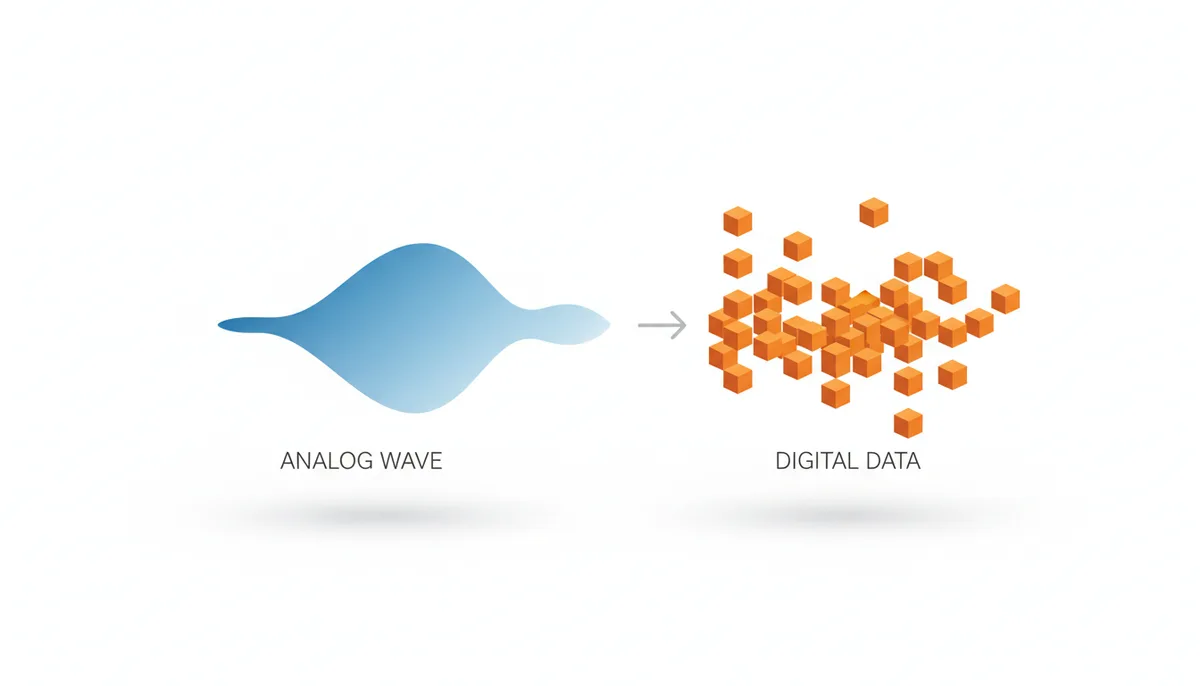
You've dragged an MP4 into a converter, and now it's asking you a question with a number attached: 128, 192, 256, 320 kbps. Pick one. Most people either grab the biggest number on the theory that bigger must be better, or leave it at whatever the default is and hope for the best. Both approaches can burn you — one wastes storage on quality that was never in the video to begin with, and the other can make a decent recording sound like it's playing through a wet towel.
Bitrate is a real trade-off with real consequences, and the annoying part is that the converter won't tell you which number is right, because the right number depends on three things only you know: what's actually inside your video file, what you'll listen on, and what the MP3 is for. Once you understand what the number means, the choice stops being a guess. So let's make the number mean something.
Why Does Bitrate Matter When You Convert a Video to MP3?
Bitrate is a budget. Specifically, it's the number of bits the file is allowed to spend describing one second of sound. A 128 kbps file spends 128,000 bits per second. A 320 kbps file spends 320,000. For reference, the audio on a CD spends 1,411,000 bits per second — so even the fattest MP3 is working with less than a quarter of CD's budget, and a 128 kbps file is working with about one-eleventh of it.
The closest analogy is photo resolution. A high-resolution photo uses more pixels to describe the scene, so you see more detail and the file gets bigger. Bitrate is resolution measured over time: more bits per second means the encoder can describe the waveform more faithfully, and the file grows in direct proportion. Double the bitrate and you roughly double the file size. That part is arithmetic, not opinion.
Where the analogy breaks down is in how the budget gets spent. A camera sensor spends its pixels uniformly across the frame. An MP3 encoder is smarter and more ruthless than that — it spends its bits selectively, keeping the detail it thinks you'll hear and throwing out the detail it thinks you won't. Which brings up the part people underestimate: this is a permanent trade-off. When you convert a video to a 128 kbps MP3, the discarded detail doesn't go into a hidden corner of the file. It's gone. No setting, app, or future conversion can bring it back. The file you make today is the best that file will ever sound.
One more wrinkle worth knowing up front: the audio inside your MP4 isn't raw. It's already compressed — usually with a codec called AAC — at its own bitrate, set by whatever device or platform created the video. So converting MP4 to MP3 isn't capturing sound fresh; it's re-compressing something that was already compressed once. That fact drives a lot of the advice later in this article, so keep it in your back pocket.
The core relationship, then, looks like this: higher bitrate means better potential quality and always means a bigger file. Lower bitrate saves space and costs fidelity. The word "potential" is doing work in that sentence — your source video sets a ceiling on what's possible, and Section 5 is entirely about that ceiling.
How Does MP3 Compression Actually Make Files Smaller?
Start with a number that should seem impossible: a three-minute song on a CD takes up about 30 megabytes. The same song as a 128 kbps MP3 takes about 2.8. That's an 11:1 reduction, and the song still sounds like the song. If you've ever zipped a folder, you know compression alone can't do that — lossless packing of CD audio typically saves you maybe a third to a half, not eleven-twelfths. So MP3 must be doing something else entirely.
It is. MP3 is a lossy format: it shrinks files by permanently deleting audio data. The clever part is which data it deletes, and that decision is guided by psychoacoustics — the science of what human ears actually perceive, as opposed to what microphones measure. An MP3 encoder carries a mathematical model of your hearing, and it uses that model to find sound you provably cannot hear, then throws exactly that sound away.
The model rests on two pillars. The first is the absolute threshold of hearing: at every frequency, there's a volume below which a tone is inaudible, and the curve isn't flat. Human hearing is most sensitive in the range of speech, roughly 2 to 5 kHz, and progressively deafer toward the deepest bass and the highest treble. Any component of the music that sits under that curve can be deleted outright. It contributes nothing you'd ever notice.
The second pillar is the more powerful one: auditory masking. When a loud sound plays, it doesn't just coexist with quieter sounds — it drowns them. A loud tone at one frequency raises the audibility threshold for quieter tones at nearby frequencies, and the effect spreads upward in frequency more than downward. You experience this constantly without naming it: when a bus roars past, the person next to you hasn't stopped talking, but their voice is gone from your perception. The information arrived at your eardrum and your brain declined to process it.
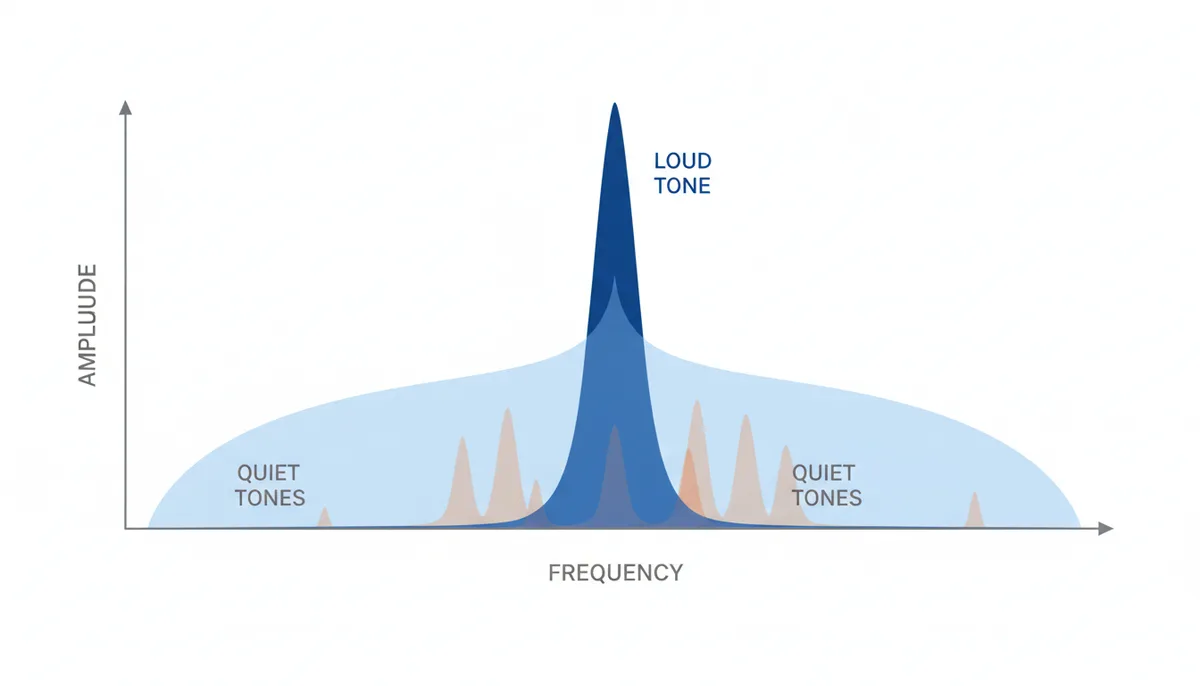
The encoder exploits this relentlessly. It chops the incoming audio into frames of about 26 milliseconds, splits each frame into frequency bands, and runs the psychoacoustic model on every one. For each band it asks: what's the loudest thing here, what does that loud thing mask, and what's already under the absolute hearing threshold? Everything that fails the test is discarded. The surviving components get encoded with the available bits, and the masking curve even tells the encoder how sloppily it can afford to encode them — quantization noise that hides under a masker is noise nobody hears.
There's a temporal version too. After a sharp, loud event — a snare hit, a cymbal crash — your hearing needs a few milliseconds to recover, and quiet detail in that recovery window is effectively inaudible. There's even a brief window before the hit where faint sounds get masked. The encoder knows this and spends fewer bits around transients than a naive measurement would say is safe.
Here's the consequence that matters for you: everything discarded in this process is discarded forever. If the first compression — the one baked into your video — already threw away the detail, your MP3 conversion has nothing left to work with. Bitrate buys fidelity only when fidelity exists to buy.
Constant vs. Variable Bitrate (CBR vs. VBR): Which Should You Choose?
Once you've settled on a number, many converters ask a second question: constant or variable? This one is easier than it looks.
CBR (Constant Bitrate) gives every second of audio the same data budget. At 192 kbps CBR, a silent gap between songs gets 192,000 bits, and the densest chorus in the track gets 192,000 bits. One of those seconds needs the money; the other is stuffing cash in a mattress. The payoff for this waste is predictability: file size is exact and computable in advance, and because every second occupies the same number of bytes, players can seek to any timestamp instantly.
VBR (Variable Bitrate) hands the encoder a quality target instead of a fixed budget and lets it spend per frame. A quiet solo passage might get 80 kbps' worth of attention; a layered wall of guitars gets 250 or more. The LAME encoder — the reference MP3 encoder that most quality tools are built on or measured against — exposes this as a scale from V0 (roughly 245 kbps on average) down to V9 (roughly 65 kbps). V2, averaging around 190 kbps, has been a music-library favorite for years because it sounds close to transparent while costing noticeably less space than 320 CBR.
There's also a compromise mode called ABR (Average Bitrate), which targets a long-run average while letting individual frames flex. It exists mostly for situations that need a bandwidth ceiling without CBR's rigidity.
The reason VBR wins on efficiency is simple: music isn't uniformly complex, and speech is even less so. A fixed budget is calibrated for the worst second in the file; a variable budget pays for complexity only when complexity shows up. In blind listening comparisons, a well-tuned VBR encode routinely matches a CBR encode that costs 20–30% more storage.
CBR retains two honest advantages. First, compatibility: a handful of genuinely old devices — early-2000s portable players, some car head units — misread VBR files, displaying wrong durations or stumbling on seek. Second, certainty: if you must know the exact size before converting, or you're feeding a fixed-bandwidth stream, CBR is the only mode with a guaranteed number.
My position: use VBR unless you can name the specific constraint that forbids it. "Just in case" is not a constraint.
| Attribute | CBR | VBR |
|---|---|---|
| Quality efficiency | Spends identical bits on silence and on dense passages, so part of every file is wasted | Concentrates bits on complex passages; typically matches CBR quality at 20–30% less size |
| File size predictability | Exact — computable to the kilobyte before you convert | Approximate — the final size depends on the material and is known only after encoding |
| Compatibility | Plays correctly on essentially every MP3-capable device ever made, including 1990s hardware | Fine on modern phones, computers, and cars; very old players may show wrong durations or balk at seeking |
| Best use case | Legacy hardware, fixed-bandwidth streaming, strict size targets | Everything else — personal libraries, phones, modern car stereos |
A Practical Comparison: What Do Different Bitrates Actually Sound Like?
Numbers on a dropdown are abstract until you attach sounds to them. Here's what each common tier actually delivers, based on what the encoder can afford to keep at that budget.
32–64 kbps is speech territory. At 32 kbps mono, a voice is intelligible and little more; music at this tier is an act of cruelty. At 64 kbps, spoken word sounds clean and present, which is why talk radio streams and podcast apps have historically lived here. Try music at 64 kbps stereo and the high frequencies turn watery — cymbals hiss and swirl instead of shimmering, and the whole recording sounds like it's wrapped in plastic.
96 kbps is the quiet workhorse for voice content. Lectures, interviews, and audiobooks come through clearly, and an hour of audio costs about 42 MB. Music still suffers — stereo image narrows, treble detail smears — but for a talking head recorded on a webcam, you were never going to hear that detail anyway.
128 kbps is the number with history: the bitrate of the download era, the default that defined a generation's idea of "an MP3." For casual listening it's passable. Under scrutiny it shows its seams. Hi-hats and cymbals develop a "swishy" quality, like someone spraying an aerosol can in time with the music. Sharp transients — castanets, a picked acoustic guitar attack — get smeared, sometimes with a faint ghost of the hit appearing a hair early (a flaw called pre-echo, born from the encoder's 26-millisecond frames being too coarse for sudden events). Sustained high notes can warble. If the source video's audio was already modest, 128 kbps stacks a second round of these artifacts on top.
192 kbps is where the wheels stop wobbling. The artifacts above recede to the point where most listeners, on most material, on most equipment, stop reliably hearing them. This is the sweet spot for an everyday music library, and it's where I'd put my own files for phone and car listening.
256 kbps buys near-transparency. On ordinary music through ordinary gear, the difference between this and the original is effectively academic. You're paying roughly a third more space than 192 for insurance you may never collect on.
320 kbps is MP3's ceiling — the most the format can spend. At this budget the encoder can fund almost every band almost every frame, and the result is audibly identical to CD for the overwhelming majority of people and recordings. It's the right choice for archiving music you love, and an expensive habit if applied to everything indiscriminately.
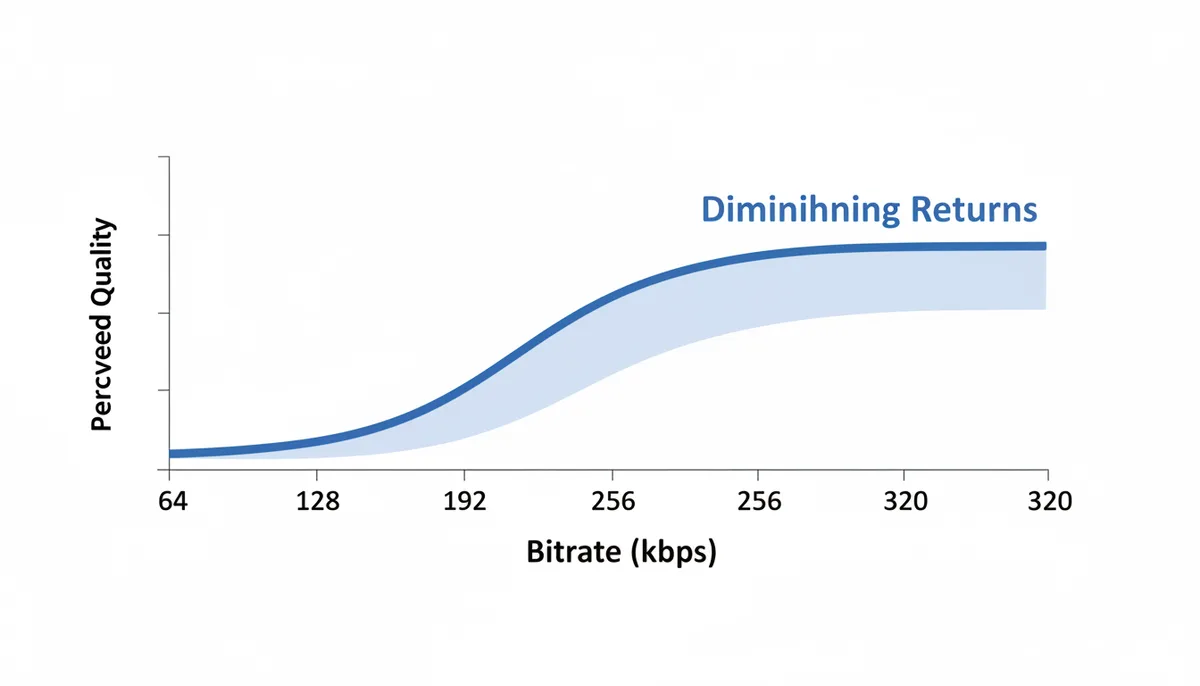
Notice the shape of these gains: 64 to 128 kbps is a transformation, 128 to 192 is a clear improvement, 192 to 256 is subtle, and 256 to 320 is mostly faith. That's diminishing returns baked into the design — once every audible band is funded up to the masking threshold, additional bits have nothing audible left to buy. The encoder isn't holding out on you at 192; it's just running out of problems your ears can detect.
| Bitrate (kbps) | What It Sounds Like | Best For | File Size per Minute |
|---|---|---|---|
| 64 | Clear speech; thin, watery music | Podcasts, talk radio, voice memos | ≈ 0.47 MB |
| 96 | Clean voice; music loses sparkle and stereo width | Lectures, audiobooks, interviews | ≈ 0.70 MB |
| 128 | Decent casually; swishy cymbals and smeared attacks under scrutiny | Casual listening, maximum-space-saving music | ≈ 0.94 MB |
| 192 | Clean and balanced; obvious flaws gone for most listeners | Everyday music libraries, phone and car | ≈ 1.41 MB |
| 256 | Near-transparent on typical gear and material | Good headphones, attentive home listening | ≈ 1.88 MB |
| 320 | MP3's ceiling; indistinguishable from CD for most people | Archiving favorites, critical listening | ≈ 2.34 MB |
Match the tier to the job. A recorded lecture from a meeting platform? 96 kbps and never think about it again. A concert video you ripped because the performance doesn't exist anywhere else? If the source is good, 320. The error isn't picking a low number — it's picking a number without asking what the file is for.
The "Garbage In, Garbage Out" Rule: Why Your Source Video Matters Most
Here's the uncomfortable fact that converter interfaces never mention: the quality of your MP3 was mostly decided before you opened the converter. The audio track inside a video file has already been compressed once, at a bitrate chosen by the camera, the recording app, or the streaming platform that produced the file. Audio in streamed and casually recorded video commonly lands somewhere in the 64 to 160 kbps neighborhood — often AAC — which means the ceiling on your output quality may be far lower than the dropdown's biggest number implies.
So what happens when you convert a video with 96 kbps AAC audio into a 320 kbps MP3? The file roughly triples in size compared to a sensible setting, and the sound does not improve by one percent. It can't. The detail that 320 kbps could have preserved was deleted by the first encoder, before you ever saw the file. Worse, the process — called transcoding, re-encoding from one lossy format to another — actively shaves off a little more quality. The MP3 encoder can't distinguish the original signal from the first encoder's artifacts. It treats the swishy cymbals as intentional musical content and spends your bits faithfully preserving the swish. Then its own psychoacoustic model discards a fresh layer of detail on top. It's enlarging a 400-pixel thumbnail to poster size: the pixels get bigger, the picture doesn't get sharper.
This is why the first step of a good conversion happens before the conversion: check the source's audio bitrate. The free tool MediaInfo will tell you the codec, bitrate, and sample rate of every stream in a video file in one glance. VLC works too — play the file, open Tools → Codec Information, and look at the audio stream's bitrate line. Once you know the source is, say, 128 kbps AAC, the sane outputs are 128 or 192 kbps MP3. My rule of thumb: set the MP3 at or modestly above the source bitrate, and treat anything beyond that as paying for shelf space you'll never use.
Two more properties of the source set hard ceilings, and they're worth understanding even though you rarely control them.
Sample rate is how many times per second the audio waveform was measured. The Nyquist-Shannon theorem says a digital recording can capture frequencies up to half its sample rate, so CD's 44.1 kHz tops out at 22.05 kHz — comfortably above human hearing. Video audio is almost always recorded at 48 kHz, giving a 24 kHz ceiling. The practical advice: don't bother resampling a 48 kHz source down to 44.1 kHz. MP3 handles 48 kHz natively, and the conversion buys you nothing.
Bit depth applies to uncompressed PCM audio like WAV — it's the precision of each individual sample, and 16-bit yields roughly 96 dB of dynamic range, more than any listening room uses. Here's the part that confuses people: MP3 has no bit-depth setting, because MP3 doesn't store samples at all — it stores frequency-band coefficients. If a converter offers you "bit depth" on an MP3 export, that dial is decoration.
And if the source video's audio is clipped, distorted, or recorded at whisper level next to an air conditioner, no bitrate on Earth fixes that either. Compression settings govern how faithfully the source is preserved. They do not govern how good the source is.
Calculating MP3 File Size: The Simple Math
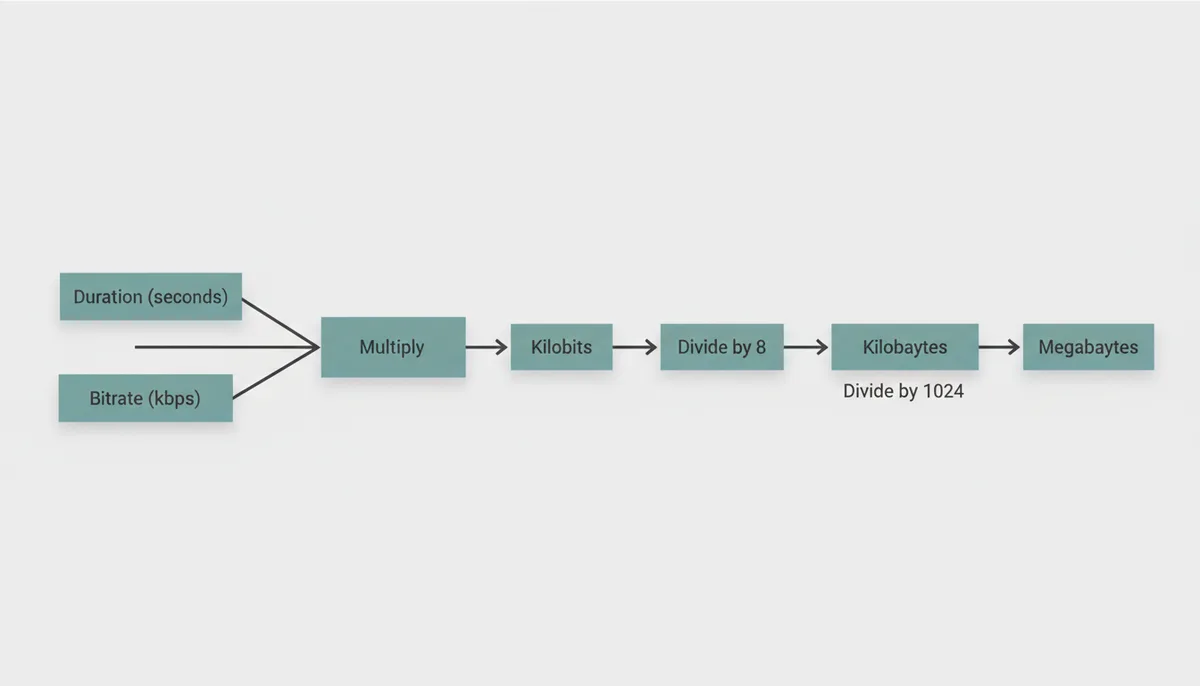
For CBR files, the size formula has one line:
File size in kilobits = bitrate in kbps × duration in seconds.
Then two conversions: divide by 8 to get kilobytes (because 8 bits make 1 byte — this is also why a "100 megabit" internet connection downloads at 12.5 megabytes per second), and divide by 1024 to get megabytes.
Worked example. A 3:00 song at 192 kbps:
- Duration in seconds: 3 × 60 = 180 s
- Total data: 192 kbps × 180 s = 34,560 kilobits
- To kilobytes: 34,560 ÷ 8 = 4,320 KB
- To megabytes: 4,320 ÷ 1,024 = ≈ 4.22 MB
If you only memorize one number, memorize this: 128 kbps costs almost exactly 1 MB per minute (0.94 MB, precisely). Every other bitrate scales linearly from there. 64 kbps is half a megabyte a minute. 256 is two. A 45-minute lecture at 96 kbps comes out near 32 MB. A thousand three-minute songs at 192 kbps fill about 4.2 GB; the same library at 320 kbps fills about 7 GB. Storage questions stop being abstract once you can run this math in your head.
For VBR, the same formula works as an estimate — plug in the target's average bitrate — but treat the result as a promise with wiggle room. The encoder spends what the material demands, so at the same V setting a sparse solo-piano piece might land at 170 kbps average while dense, loud rock pushes past 210. Two albums encoded at identical settings can differ in size by a quarter or more, and both are behaving exactly as designed.
One thing the formula doesn't include: metadata. The ID3 tag carrying title, artist, and album adds a few kilobytes — negligible. Embedded cover art is not negligible: a single 1200×1200 album image can add several hundred kilobytes to every file it rides in. If your converted files come out noticeably fatter than the math predicts, check whether your converter or tagger tucked artwork inside.
When a Higher Bitrate Stops Making a Difference
Somewhere between 192 and 320 kbps, the limiting factor stops being the file and starts being you. Three ceilings decide whether extra bits buy anything audible.
Your hearing. Adult ears commonly lose sensitivity above 15–16 kHz, and the last kilobits of a 320 kbps encode are substantially spent up there. Your equipment. The earbuds that came with the phone, laptop speakers, a Bluetooth speaker on a kitchen counter — none of these resolve the differences a high bitrate protects. Your environment. A car at highway speed has a noise floor from tires and wind that masks musical detail using the exact mechanism Section 2 described. The road is running its own psychoacoustic model, and it's more aggressive than LAME's.
In controlled blind comparisons — where listeners switch between a lossless original and a high-bitrate encode without knowing which is which — most people, including plenty who describe themselves as having golden ears, cannot reliably tell a good 256 kbps-or-better encode from the source on ordinary music. The exceptions are real but narrow: so-called killer samples like castanets and harpsichord that trigger pre-echo, exceptionally well-recorded acoustic material, high-end headphones or monitors, a quiet room, and a listener who has practiced hearing artifacts. If that entire stack describes you, you already know it does.
Where a high bitrate genuinely earns its size: critical listening in a quiet space on revealing equipment, and archiving the audio of something irreplaceable — a family recording, a performance that exists nowhere else — where the cost of regretting the setting later exceeds the cost of storage now. One caution on archiving, though: if you expect to edit or re-encode the audio ever again, MP3 at any bitrate is the wrong container, because every lossy re-encode shaves off another layer. Keep the original video file, or export a lossless copy, and treat MP3s as listening copies.
And the recurring caveat, because it bites hardest at the top of the scale: the gap between 192 and 320 kbps only exists when the source has detail there to preserve. Upscaling a 96 kbps video soundtrack to 320 kbps buys the largest possible file with the smallest possible benefit. High bitrates are a preservation tool, not a renovation tool.
Beyond MP3: How Do Formats Like AAC and FLAC Compare?
MP3 won the format war so long ago that "MP3" became the generic word for a digital audio file. It won on timing and openness, not on technical merit, and the formats that followed were designed specifically to beat it.
AAC (Advanced Audio Coding) is MP3's designated successor, built by the same standards bodies with another decade of psychoacoustic research baked in. At the same bitrate it simply sounds better — cleaner transients, steadier high frequencies — or, framed the other way, it matches MP3's quality while spending fewer bits. This is why the audio inside your MP4 is very likely AAC, why YouTube and Apple standardized on it, and why iTunes sold 256 kbps AAC files. A practical implication: if your whole listening life happens on modern phones and computers, converting video audio to AAC (or keeping it as AAC) means one fewer generation of lossy damage than converting to MP3.
Ogg Vorbis is the open-source contender in the same class as AAC — comparable efficiency, no patent baggage, and most famous as the format behind Spotify's streams and a great deal of game audio. Its weakness is hardware: outside of software players, support is spotty.
FLAC plays a different game entirely. It's lossless — think of it as a ZIP file for audio. Everything that goes in comes back out bit-for-bit identical, so the typical result is roughly half the size of the uncompressed original, not the tenth that MP3 achieves. FLAC is the right answer for archiving, editing, and ripping a CD collection once, forever. It's the wrong answer for stuffing a phone with music for the gym.
Which leaves MP3 with exactly one superpower, and it's a big one: universality. Every device, operating system, car stereo, game console, kiosk, and fifteen-year-old gadget in a drawer will play an MP3. When you convert a video to audio for a device you don't fully control — a relative's ancient car, a cheap media player, software of unknown vintage — MP3 is the bet that never loses.
The decision rule: modern ecosystem, stay in the family → AAC. Archive or edit later → FLAC or keep the original file. Anything old, unknown, or shared → MP3, and spend the saved worry on picking the right bitrate.
| Format | Compression Type | Efficiency (Quality vs. Size) | Compatibility | Best For |
|---|---|---|---|---|
| MP3 | Lossy | Dated — needs more bits than newer codecs for the same quality | Universal; plays on virtually anything made in the last 25+ years | Maximum device support; the safe default |
| AAC | Lossy | Noticeably better than MP3 at the same bitrate | Excellent on modern phones, computers, and cars; patchy on very old gear | Apple and YouTube ecosystems, video soundtracks |
| Ogg Vorbis | Lossy | Comparable to AAC at similar bitrates | Broad in software, rare in dedicated hardware players | Streaming services, game audio, open-source workflows |
| FLAC | Lossless | No quality loss at all; files run roughly 2–4× a 320 kbps MP3 | Good on computers and modern phones; absent from some car stereos and budget players | Archiving, editing, one-time CD rips |
Decoding Advanced Settings: Stereo Modes and Encoder Quality
Past the bitrate dropdown, a few converters expose dials that look technical and intimidating. Three of them are worth understanding, and none of them require an engineering degree.
Channel mode comes in three flavors. Mono merges everything into a single channel and spends the entire bitrate on it — for pure speech, mono at 64 kbps often sounds better than stereo at 96, because one well-funded channel beats two starved ones. Full stereo encodes left and right independently. Joint stereo, the default in any sane encoder, is the clever one: most music puts vocals, bass, and drums in the center, meaning the two channels carry mostly identical information. Joint stereo encodes the common "middle" once and a small "difference" signal for what's unique to each side, getting stereo sound at close-to-mono cost. At very low bitrates encoders add an even more aggressive trick (intensity stereo) that slightly blurs directional detail in the highs to save serious bits. Leave joint stereo on. Forcing full stereo is how people waste 30% of their budget protecting a stereo image their earbuds can't reproduce anyway.
The encoder itself matters more than most settings it offers. MP3 is a specification for how a file is decoded, not how it's encoded, so two encoders can produce 192 kbps files of wildly different quality from the same source. LAME became the benchmark through years of public, blind listening tests where its psychoacoustic model was tuned against real human votes, and a well-tuned encoder at 192 kbps can beat a sloppy one at 256. The practical upshot: pick a converter that runs a serious encoding engine, and stop agonizing over 32 kbps increments. This is one reason browser-based tools like ExtractSound lean on an established audio engine running locally on your machine — the conversion quality is set by the encoder, and the file never has to leave your device to get it.
The low-pass filter is the setting you rarely see but always hear. To fund the frequencies you care about, encoders silently cut everything above a threshold, and that threshold slides with bitrate: at 128 kbps content above roughly 15–16 kHz is gone; at 320 kbps the filter sits around 20 kHz. Most adults can't hear up there regardless — but on cymbals, strings, and well-recorded acoustic music, that top octave carries the "air" that makes a recording feel open. The dullness people describe in low-bitrate files is often the low-pass filter doing exactly its job.
Your Final Checklist: Choosing the Right Bitrate for Any Situation
Everything above collapses into a short set of decisions. Run them in order and you'll never stare at a quality dropdown again.
- Check the source first. Use MediaInfo or VLC to read the video's audio bitrate. Your output ceiling is that number plus a small margin, not the top of the menu.
- Podcasts, lectures, audiobooks: 96–128 kbps VBR, or mono at 64–96 kbps for pure talk. A 45-minute lecture at 96 kbps is about 32 MB — small enough to keep semesters' worth.
- Everyday music for phone, car, and casual listening: 192 kbps VBR. A thousand three-minute songs cost around 4.2 GB, and on real-world gear you will not hear the compromise.
- Archiving something irreplaceable or listening critically: 320 kbps CBR or the top VBR tier (LAME V0, roughly 245 kbps average). Do this only when the source deserves it — and if the audio is truly irreplaceable, keep the original video file too.
- Never upconvert. A 96 kbps source converted to 320 kbps produces a large file with small-file sound, plus one extra generation of lossy damage.
- When genuinely unsure: 192 kbps VBR, joint stereo, original sample rate. It's the setting with the widest margin for error in both directions.
When you run a conversion in ExtractSound, the quality menu is where these numbers live — match the tier to the job and the source, and the choice takes about five seconds. The mistake to avoid isn't picking 128 instead of 192. It's picking anything at all without knowing what was in the video.
Frequently Asked Questions
Can I improve a 128 kbps MP3 by converting it to 320 kbps?
No, and this is the most expensive misconception in audio conversion. The detail a 128 kbps file lacks was deleted when it was encoded — it isn't hidden or dormant, it's gone. Re-encoding at 320 kbps runs the audio through a second lossy encoder, which faithfully preserves the first encode's artifacts, discards a little more detail of its own, and hands you a file that's two and a half times larger and sounds the same or very slightly worse. The only fix for low-bitrate audio is going back to a better source.
Is MP3 better than AAC?
Technically, no — AAC is the newer design and delivers better sound than MP3 at the same bitrate, which is why Apple, YouTube, and most video files standardized on it. Practically, MP3 still wins the compatibility contest outright: anything with a speaker and a chip plays MP3, while AAC support on older or off-brand hardware can be hit and miss. If everything you listen on is modern, AAC is the better technical choice. If you want a file that will play anywhere, forever, without a second thought, that's still MP3.
What bitrate does Spotify or Apple Music use?
Spotify's paid tier tops out around 320 kbps using Ogg Vorbis, with the free tier streaming at lower rates. Apple Music's standard streams are 256 kbps AAC, and it also offers lossless tiers above that. Because both services use more efficient codecs than MP3, matching them bit-for-bit isn't the right comparison — the closest MP3 equivalents are a high-quality VBR setting like LAME V0 or a straight 320 kbps encode, which will put you in the same perceptual neighborhood on any reasonable equipment.
Does the audio quality of the original video matter?
It matters more than every setting in the converter combined. Your MP3 can only preserve what the source contains, and the audio track in a typical video file was already compressed — often to somewhere between 64 and 160 kbps — before you ever downloaded or recorded it. A clean, high-bitrate source gives even modest settings great results; a poor source caps everything. Always start from the highest-quality version of the video you can get, and check the audio stream's bitrate before choosing your output.
Should I always use VBR instead of CBR?
For listening, yes — VBR spends bits where the music actually needs them, so you get CBR-equivalent quality in a meaningfully smaller file. The exceptions are specific and nameable: genuinely old hardware that misreads VBR files and shows wrong track lengths or stumbles on seeking, streaming setups that require a fixed bandwidth, and cases where you must know the exact file size before you convert. If none of those describe your situation, VBR is the right default and CBR is the special case.
Will I actually hear the difference between 192 kbps and 320 kbps?
It depends on four things stacking in your favor: your hearing, your equipment, your environment, and your material. In a quiet room with high-quality headphones and a well-recorded acoustic track, some listeners can catch it — the difference lives in the finest treble detail and the edges of sharp transients. In a car, on a commute, through the earbuds that came with the phone, almost no one can, and that includes people who are confident they can. The honest way to settle it for yourself is to convert the same song both ways and have someone switch between them without telling you which is which. Most people who try that experiment stop buying the bigger number.
Sources
- Hydrogenaudio Knowledgebase — Technical details and community-accepted best practices for MP3 encoding, including comparisons of CBR vs. VBR and the quality of LAME encoder presets.
- FFmpeg Documentation — Authoritative information on specific audio encoding options, codecs (like libmp3lame), and advanced settings like stereo modes and bitrate controls.
- Sound On Sound Magazine — Practical explanations of data compression, sample rates, and bit depth from the perspective of audio professionals.
- The LAME Project — Claims regarding LAME being the highest-quality MP3 encoder and details about its development and features.